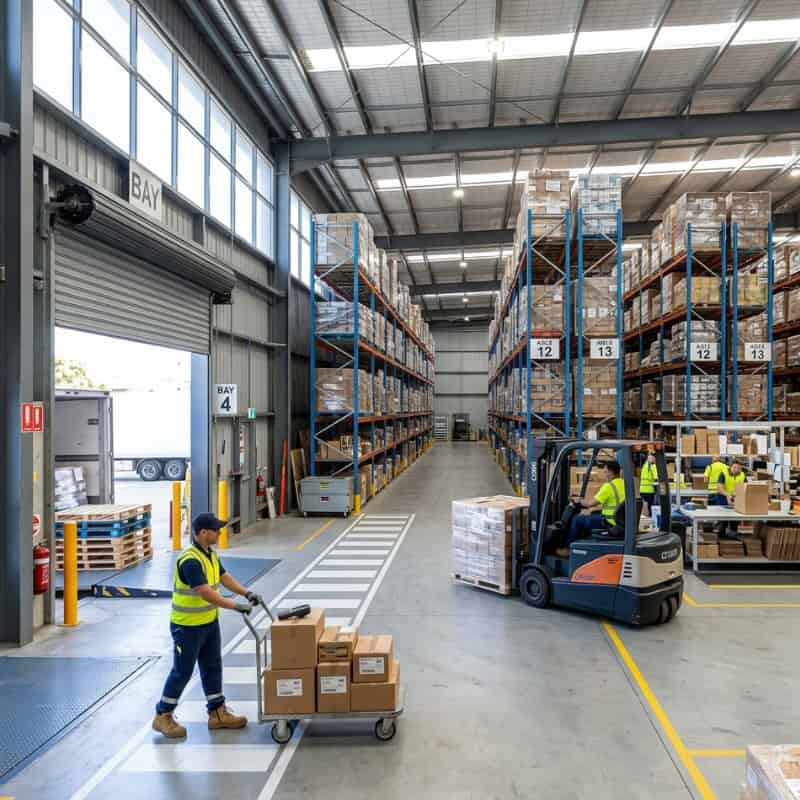
Warehouse work looks simple from the outside: goods arrive, get stored, then leave again.
Inside a busy Sydney warehouse, it’s a tightly coordinated system made up of:
• equipment (the physical tools that move loads)
• process (the agreed steps people follow every day)
• layout (how space, aisles, docks, and storage are arranged)
• information (barcodes, scanners, WMS, labels, and paperwork)
• safety controls (to reduce hazardous manual tasks and traffic risks)
When those parts fit together, stock typically moves with fewer touches, fewer errors, less damage, and less strain on workers. Using suitable materials handling equipment hire can help businesses improve workflow efficiency and reduce manual handling risks. When those elements don’t work well together, it’s common to see bottlenecks, rework, and higher injury risk.
What is a “materials handling system” in a warehouse?
A materials handling system is the combined way a warehouse:
• receives goods
• moves them to storage
• replenishes pick locations
• picks orders
• packs and dispatches shipments
• handles returns, damaged stock, and exceptions
It’s not just forklifts or conveyors. It’s also how you decide:
• where items live (slotting)
• how they’re labelled
• how far people must walk
• how many times a carton is lifted
• how pallets are staged at docks
• what happens when something doesn’t scan, doesn’t fit, or arrives damaged
Quick answer
Most Sydney warehouses run a flow like: receiving → check/count → label → stage → put-away → storage → replenishment → picking → packing → dispatch, supported by equipment (pallet jacks, forklifts, trolleys, lifters, conveyors) and information tools (labels, scanners, WMS). Strong systems usually reduce double handling and help design out hazardous manual tasks by using layout, mechanical aids, and standardised steps.
Common types of warehouse handling systems
Most sites sit somewhere on a spectrum. This quick guide helps you self-identify where you are now (and what tends to break first as volume grows).
Manual-basic systems (simple, flexible, labour-heavy)
Typical profile:
• low-to-moderate daily volume
• short travel distances
• more reliance on people remembering “where things go”
• tools like trolleys, hand trucks, manual pallet jacks, basic shelving
Strengths:
• cheap to start
• adaptable when product mix changes
Common pressure points:
• walking time grows quickly
• picking accuracy relies heavily on training and supervision
• manual handling exposure can climb as volume increases
Semi-mechanised systems (the common “sweet spot”)
Typical profile:
• moderate-to-high volume
• mix of pallets and cartons/totes
• basic WMS or barcode scanning at key points
• combination of electric pallet trucks, forklifts, stackers, lift assists
Strengths:
• good throughput without heavy infrastructure
• scalable with better slotting and replenishment discipline
Common pressure points:
• traffic conflicts (forklifts + pedestrians)
• replenishment becomes reactive unless rules are set
• staging spills into aisles during peaks
Conveyor-led systems (flow-focused, higher consistency)
Typical profile:
• steady carton/tote movement
• packing and dispatch are central
• conveyors, gravity lanes, and defined induction points
Strengths:
• reduces walking and repeated carrying
• helps standardise work and smooth peaks
Common pressure points:
• less flexible if product sizes vary widely
• “One jam stops many” if maintenance and housekeeping slip
• Poor upstream receiving/put-away discipline still creates delays
Automation-led systems (high volume or high accuracy needs)
Typical profile:
• high SKU counts, high order volume, or strong accuracy requirements
• AS/RS, AMRs/AGVs, sortation, goods-to-person stations
• strong data discipline (locations, barcodes, replenishment rules)
Strengths:
• can lift throughput and accuracy significantly
• can reduce some repetitive walking and manual transfers
Common pressure points:
• requires stable processes and clean data
• change management and exception handling matter a lot
• ROI depends heavily on volume profile and demand consistency
Q&A: Which system type is “best”?
It depends on volume, product profile, space constraints, labour availability, and how predictable your demand is. Many Sydney warehouses get strong results by refining a semi-mechanised setup (slotting, replenishment rules, clearer staging, better mechanical aids) before moving into heavy fixed systems or automation.
How the warehouse flow works from receiving to dispatch
To understand how the system works, follow one pallet (or one carton) through the building.
1) Receiving (inbound) and unloading
Inbound starts at the dock. The goals are:
• unload safely
• confirm you received what you expected
• prevent mixed or unknown stock from entering the warehouse
Typical activities:
• check delivery documentation (PO, ASN, manifests)
• visually inspect for damage
• unload pallets/cartons (forklift, pallet jack, dock leveller)
• stage items in a receiving lane
What makes receiving efficient:
• clear dock appointments (even informal ones)
• enough staging space so freight doesn’t block aisles
• labels ready early (so stock doesn’t sit “unidentified”)
Common Sydney reality:
• tight dock aprons, mixed vehicle sizes, and peak-hour congestion can compress unloading windows. That makes staging rules and traffic separation even more important.
Q&A: What’s the biggest receiving mistake?
Letting goods enter the warehouse without clear identification. Unlabelled pallets can become “mystery stock,” which often creates recounts, rework, and picking errors later.
2) Quality checks, counting, and exception handling
Before items disappear into storage, most warehouses do some version of:
• count verification (full count or sample)
• condition checks (damage, expiry, temperature breaches, packaging integrity)
• quarantine for exceptions (damaged, wrong item, over/short)
A simple but powerful rule:
• separate “good stock” lanes from “exceptions” lanes
So the team doesn’t accidentally put away problem freight and spend days chasing it.
Q&A: Why do exceptions cause so much delay?
Because they interrupt the standard flow. If exceptions aren’t physically separated and processed with a clear rule-set, they often get touched repeatedly, moved around, and eventually block space meant for normal work.
3) Put-away (moving goods into storage)
Put-away is where a warehouse either wins or loses time.
Put-away includes:
• identifying the storage location
• transporting the load there
• placing it safely
• confirming the location (scan/confirm)
Put-away methods vary:
• direct put-away to a known bin (fast, if locations are maintained)
• staged put-away (when receiving is busy or the location isn’t ready)
• cross-docking (if goods are needed immediately for dispatch)
Put-away is also where you should aim to reduce hazardous manual tasks by designing the job:
• minimise lifts from floor level
• keep heavy or awkward cartons in accessible zones
• use mechanical aids when repetition or load size increases
If you’re aligning with local WHS expectations, SafeWork NSW focuses on designing work to reduce hazardous manual tasks rather than relying on “lift properly” training alone. You can read their guidance here: Hazardous manual tasks guidance.
Q&A: What is “good” put-away?
Good put-away means stock goes to the right place the first time, with a confirmation step (scan or check), and without creating congestion at the end of aisles or in front of pick faces.
4) Storage (racking, shelving, floor stack, mezzanine)
Storage is not passive. It influences:
• travel distance
• congestion points
• replenishment frequency
• damage risk
• how often people lift/carry items manually
Common storage types you’ll see in Sydney warehouses:
• selective pallet racking (most common)
• longspan shelving for cartons/totes
• floor stacking for bulk or short-term fast movers
• mezzanines for e-commerce pick/pack areas
• specialised zones for oversized loads or fragile goods
A key principle:
• The more accessible the location, the more valuable it is
Save easy-access zones for high movers, heavy items, or items that cause delays if hard to reach.
5) Replenishment (feeding the pick faces)
Replenishment is the “hidden engine” of order fulfilment.
Pick faces (forward pick locations) are designed for speed and accuracy. But they’re small. When they run dry, pickers stop and the whole warehouse slows down.
Replenishment methods:
• planned replenishment (triggered by min/max levels)
• wave replenishment (before a batch run)
• reactive replenishment (someone calls out “we’re out!”)
The more your system relies on reactive replenishment, the more you’ll typically see:
• pick interruptions
• forklift/pedestrian conflicts
• rush moves (higher damage risk)
Q&A: What’s the easiest way to reduce replenishment chaos?
Set simple min/max rules for top movers and schedule replenishment at quieter times, rather than during peak picking windows.
6) Picking (the core outbound task)
Picking is where warehouse labour time often concentrates, which is why it’s usually the first place sites feel pressure as order volume grows.
Common picking styles:
• discrete picking (one order at a time)
• batch picking (multiple orders at once, sort later)
• zone picking (people stay in zones; orders move between zones)
• wave picking (released in timed waves aligned to dispatch)
Picking speed is influenced by:
• walking distance
• slotting quality
• pick-face design (height, visibility, label clarity)
• congestion in aisles
• how often pickers must handle awkward items
At this stage, the system often rises or falls on whether the right tools are within reach. For example, when pickers and replenishment runners can access the appropriate materials handling equipment for the load type and travel distance, you’ll usually see fewer improvised lifts, fewer “workarounds,” and steadier throughput.
Q&A: What causes most picking errors?
Errors often come from weak identification (similar-looking items), unclear labelling, and rushed work during peaks. The fix is usually a combination of better slotting, clearer labels, and scan verification—not just “be careful.”
7) Packing, consolidation, and dispatch
Packing is where you protect the product and confirm the order is correct.
Packing tasks:
• check item count and SKU accuracy
• choose packaging that fits (avoid overboxing)
• add void fill where required
• label, manifest, and stage for carriers
Dispatch tasks:
• consolidate orders by route/carrier
• stage in the right lane
• load vehicles safely and in sequence
System features that improve dispatch:
• lane discipline (each carrier/route has a clear zone)
• visual management (signage, floor markings)
• simple load sequencing rules (heavy/large first, fragile protected)
Q&A: How do you reduce damage during dispatch?
Damage often happens close to dispatch when staging is rushed, stacking is inconsistent, or orders are moved repeatedly. Standardise stacking rules and packing checks, and avoid last-minute “just put it anywhere” staging.
What equipment makes up a typical warehouse handling system?
Different warehouses need different mixes. But most systems are a combination of tools and methods that match your volume, load profile, and space constraints.
Manual movement tools (low cost, high flexibility)
• trolleys and platform carts
• hand trucks
• pallet jacks (manual and electric)
• dollies and skates for awkward loads
Best for:
• small transfers
• short travel distances
• low-to-medium volume sites
Powered handling equipment (higher throughput)
• forklifts (counterbalance, reach, order picker)
• electric pallet trucks and stackers
• scissor lift tables and lift assists
• tow tuggers for milk-run style movement
Best for:
• pallet movement
• higher throughput and longer travel
• heavier loads and repeated tasks
Fixed systems (predictable flow, less flexibility)
• conveyors (carton, roller, belt)
• chutes and gravity flow lanes
• pallet flow and carton flow racking
• dock equipment (levellers, restraints)
Best for:
• high volume, steady movement patterns
• reducing walking and repeated carrying
• consistent carton/tote flows
Automation (when volume + consistency justify it)
• AS/RS (automated storage and retrieval)
• AMRs/AGVs (robotic transport)
• sortation systems
• goods-to-person stations
Best for:
• high SKU counts with stable demand patterns
• tight labour markets
• sites where accuracy and throughput are critical
Q&A: Does every Sydney warehouse need automation?
No. Many warehouses get a major uplift by improving slotting, layout, replenishment discipline, and using the right mechanical aids before they consider automation.
The “system” part: layout, rules, and information flow
A warehouse can have great equipment and still run poorly if the system around it is weak. This is where clear, practical warehouse handling rules matter more than most people expect.
Layout: reduce travel and prevent conflicts
Strong layouts:
• keep fast movers close to packing/dispatch
• separate forklift routes from pedestrian pick paths where possible
• provide staging zones that don’t block aisles
• prevent dead ends that force reversing and congestion
Weak layouts show up as:
• pickers constantly crossing forklift lanes
• staging spilling into travel paths
• long walks for everyday SKUs
Standard work: make the right way the easy way
Systems work when the same tasks happen the same way:
• receiving checklist steps
• put-away confirmation rules
• replenishment triggers
• pick verification steps
• packing standards for fragile/heavy items
When these rules are consistent, you start to get reliable outcomes. This is also why many operations teams talk about improving their warehouse handling solutions as a combination of process, layout, and equipment—because changing one without the others rarely fixes the root cause.
Information: barcodes, scanning, WMS, labels
Even a basic warehouse uses information flow:
• location labels
• carton/pallet IDs
• scanning at key control points (receiving, put-away, pick, pack)
The more accurate your data, the fewer “search missions” your team does.
Searching is invisible waste: it consumes time, blocks aisles, and frustrates everyone.
Q&A: Where should you scan if you can only scan a few points?
Typically:
• receiving (confirm it exists)
• put-away (confirm where it lives)
• pick/pack (confirm it’s the right item)
That sequence prevents most inventory and fulfilment errors.
Safety and performance: reducing hazardous manual tasks without slowing the job
Warehouse leaders often feel forced to choose between speed and safety. A good system avoids that trade-off by designing the work.
Ways systems reduce strain and risk:
• reduce the number of touches (each touch is time + risk)
• keep heavy items in the “golden zone” (roughly waist-to-chest height)
• use lift tables, lifters, and transfer aids for repeated lifts
• keep floor areas clear to prevent awkward carries around obstacles
• schedule replenishment to avoid rushing during peak picking
If you’re reviewing options for repetitive lifting, awkward load positioning, or frequent transfers between benches, pallets, and racks, a practical focus is matching tasks to the right lifting and moving equipment so people aren’t forced into unnecessary carries, twists, or hurried two-person lifts.
Q&A: What’s the biggest safety upgrade that also boosts productivity?
Reducing double handling. When you stop moving the same carton multiple times (receive → stage → move → restage → put-away), you save time and reduce lifting/carrying exposure.
A simple “walk the flow” audit you can do in 30 minutes
If you want to understand your system fast, do this walkthrough:
• start at the dock and follow one inbound item to storage
• then follow one outbound order from pick to dispatch
• count touches (every time someone lifts, carries, re-stacks, or relocates)
• note waiting points (where work queues form)
• note conflict points (forklifts and pedestrians crossing)
• note exceptions (damaged stock, missing labels, wrong locations)
If you find the same problem repeatedly, it’s usually a system issue, not a people issue.
Quickly indicate your system is under strain
• pickers regularly stop to find stock
• replenishment happens reactively during peak picking
• staging zones overflow into aisles
• “temporary” pallets become permanent obstacles
• damage spikes during peaks
• manual lifts increase because the right aids aren’t nearby
FAQ
What’s the difference between materials handling equipment and a materials handling system?
Equipment is the tool (like a pallet jack). A system is the whole flow: equipment + layout + rules + information + safety controls that keep goods moving reliably.
What are the main stages of a warehouse handling system?
Most follow: receiving → checking → labelling → staging → put-away → storage → replenishment → picking → packing → dispatch, with exceptions (damage/returns) handled via a separate path.
What’s the most common cause of warehouse bottlenecks?
Often congestion and double handling—freight getting staged in the wrong place, pick faces running empty, or forklifts competing with pedestrians in the same narrow aisles.
How do you reduce picking time without adding staff?
Improve slotting (fast movers closer), tighten replenishment rules, and reduce walking distance. The best gains often come from layout and process tweaks rather than “working faster.”
When should a warehouse switch from manual tools to powered equipment?
When loads are heavier, travel distances increase, volume grows, or tasks become repetitive enough that manual handling increases fatigue, strain, and errors. Often the first step is adding electric pallet trucks or lift assists in high-frequency zones.
Is automation worth it for Sydney warehouses?
It can be, but it depends on volume, SKU profile, and demand stability. Many sites benefit first from improving workflow discipline, storage strategy, and mechanical aids before investing in automation.